
Providers guide
publish, sealed.
How providers publish and manage signals: the Studio, Telegram, TradingView alerts, Discord, visibility, pricing and their own signing key. You can hand this page to your providers.
01The Studio
Any member becomes a provider in Studio (Become a provider) by entering a name and confirming that published signals are permanent. If the operator requires approval, the provider can publish and is listed only after verification.
| Tab | What it is for |
|---|---|
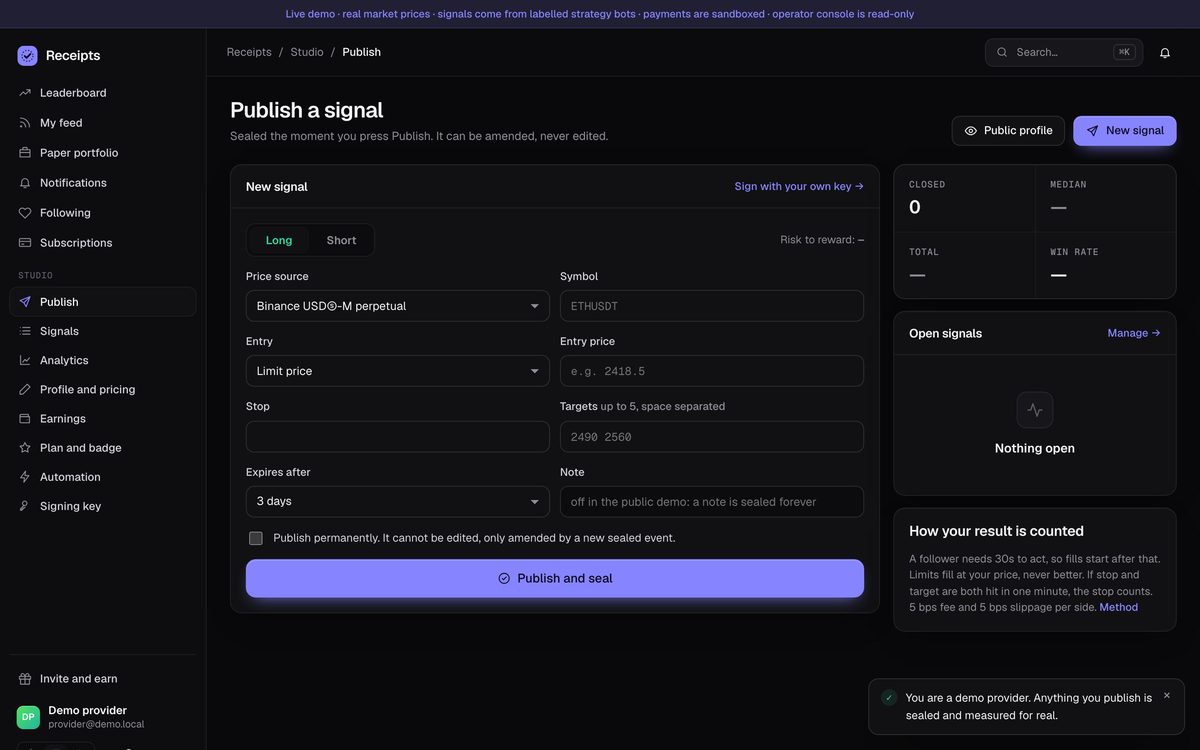
| Publish a signal | Price source, symbol (exactly as the exchange writes it, like ETHUSDT), long/short, market or limit entry, stop, up to 5 targets, expiry, optional note, and the "publish permanently" box. On publish you land on the new receipt. |
| My signals | Your recent signals. For open ones: move the stop, close at market (filled signals), or cancel (not yet filled). Each change is a new sealed event. |
| Analytics | MRR, subscribers, followers, churn. |
| Profile and pricing | Bio, markets, style, monthly price, plans and trial, reveal policy, performance billing (when allowed). |
| Earnings and payouts | Active subscribers, balance, payout requests. |
Plan and badge (/studio/plan) | Get or extend Provider Pro; request verification (with the operator's fee, if any). |
| Automation and webhooks | The badge embed code, Telegram VIP group steps, the Discord channel webhook and your private TradingView webhook address. |
| Signing key | Your own Ed25519 key (below). |
02Rules a signal must pass
- All prices positive; 1 to 5 targets; expiry in the future and within the operator's longest expiry (default 30 days).
- The operator's limits on open signals and signals per 24 hours, and the enabled price sources.
- A long's stop is below the entry and targets above it (a short: the reverse). Targets move away from the entry in order.
- A stop move stays on the losing side of the entry while unfilled and never passes the last target.
- A filled signal can be closed but not cancelled; a finished signal cannot be changed.
- The symbol is checked with the venue before sealing: an unlisted symbol is refused and nothing is sealed. A market entry is refused if the price is already past the stop or first target.
03Visibility (reveal policy)
The hash, number and time of every event are public immediately, so nobody can later claim a signal was not there. The details (symbol, prices, targets) follow the reveal policy:
| Policy | Details become public |
|---|---|
on_close (default) | when the signal is finished (closed, not filled or cancelled) |
delay_24h | 24 hours after publishing, or when finished, whichever is first |
immediate | right away |
Active subscribers and the provider always see the details. Each signal carries 128 random bits, so hidden details cannot be guessed from the public hash. Free providers (price 0) are public immediately. Hidden signals expose no fill state anywhere.
04Publishing from Telegram
Link your account first (Subscriptions and payments → Connect Telegram). Commands work in a private chat with the bot; in groups they are ignored on purpose. Needs Provider Pro when the operator charges for it.
/long SYMBOL ENTRY sl STOP tp TARGET [TARGET2 ...] [EXPIRY] [@VENUE] [| note]

/long ETHUSDT 2418.5 sl 2371 tp 2490 2560 72h
/short BTCUSDT mkt sl 64800 tp 62000 @bybit-linear
/long SOLUSDT 142.2 sl 138 tp 150 3d @binance-spot | breakout retestENTRYis a price (limit) ormkt/market.slandtpare required words. Plain numbers, no commas.EXPIRYlike72hor3d, 1h to 90d, default 72h.@VENUEdefault@binance-usdm.
| Command | Where | What it does |
|---|---|---|
/start <code> | private chat | Links the account (sent by the link from Account). |
/help, /me | anywhere | Command list; your name, subscriptions and provider status. |
/connect | the VIP group | Attaches the group to your provider profile (group admin, with Pro). |
/long …, /short … | private chat | Publishes (seals) a new signal. |
/stop SEQ PRICE, /close SEQ, /cancel SEQ | private chat | Moves the stop, closes a filled signal, cancels an unfilled one. SEQ is the "Sealed #N" number. |
05TradingView and automation webhook
Studio → Automation and webhooks shows your private address https://signals.example.com/api/hook/<your-secret-token>. Anyone with it can publish as you; if it leaks, click Replace the address. In TradingView create an alert, tick Webhook URL, paste the address and put the JSON in the Message box:
{"side":"long","venue":"binance-usdm","symbol":"ETHUSDT",
 "entry":"2418.5","stop":"2371","targets":["2490","2560"],
"expires_in_hours":72,"note":"optional"}| Field | Required | Meaning |
|---|---|---|
side | no (long) | short or sell = short; anything else = long |
venue | no (binance-usdm) | binance-spot, binance-usdm, bybit-spot, bybit-linear |
symbol | yes | Like ETHUSDT. TradingView's BINANCE:ETHUSDT.P is accepted: the prefix and .P are removed. |
entry | no (market) | A limit price, or market |
stop, targets | yes | Stop price; array of 1–5 prices (a single target is accepted) |
expires_in_hours, note | no | Default 72 hours; free text |
Answers: 201 {"sealed":true,"seq":…,"hash":"…","receipt":"https://…/r/…"} · 400 unknown venue or not JSON · 404 unknown or replaced address · 422 the signal broke a rule or the symbol does not exist.
curl -X POST -H 'Content-Type: application/json' \
  -d '{"side":"long","symbol":"ETHUSDT","entry":"market","stop":"2371","targets":["2490"]}' \
  https://signals.example.com/api/hook/<your-secret-token>
Everything you send is sealed. Test with a real, sensible signal; test signals stay in your public record.
06Discord channel
Studio → Automation and webhooks → Discord channel: paste a channel webhook (https://discord.com/api/webhooks/…) from your Discord server's channel settings, press Save and Send test. New signals and results are posted there; hidden signals are announced without their contents. The operator can switch Discord delivery off for the whole site.
07Signing with your own key
Your seal proves when you published. A signature also proves who did: anything published in your name without your key, by anyone including the site, shows on your record as unsigned or as a different key. This relies on the page code the site serves; signatures can always be checked offline.
- Create my keyStudio → Signing key. The key (Ed25519) is made in your browser and stays there.
- Download backupKeep the file private. Anyone with it can sign as you.
- Turn signing on with this keyTick the confirmation, enter your password. Your key's fingerprint is shown.
- Publish as usualPublish and every change are signed in this browser. Receipts show "Signed by provider · <fingerprint>".
On another device use Restore from backup. Webhook and Telegram cannot sign in your browser; their events show as signed by the site, unless you tick Only accept signed events, which refuses them. A key change or turning signing off needs your password. Results of a signed event are measured from the server's seal time. Needs a current browser (Chrome, Edge, Safari or Firefox from 2025 on).